Options. Messaging settings
The Messaging tab of the Options dialog box allows you to specify the Reception Mode applied only to Bopup Observer clients and permit users to apply font and color attributes to their messages (global option).
To open the Options dialog box click the  button on the toolbar or select the "Tools\Options..." item from the main menu or use the Ctrl+O hotkey.
 |
| Messaging settings |
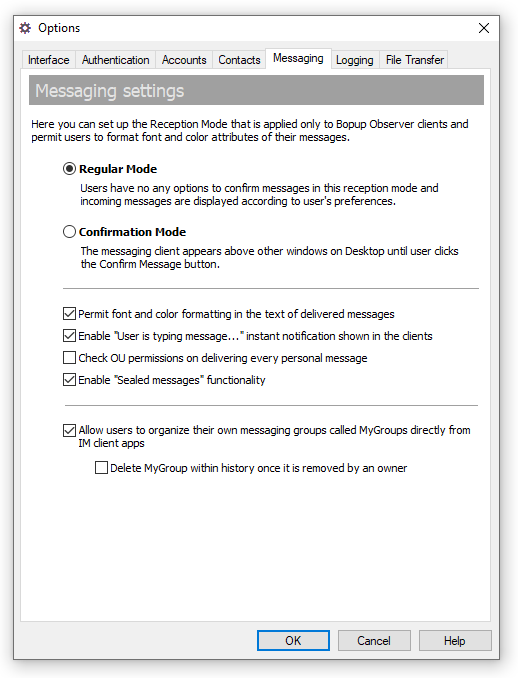
- "Regular Mode" — The normal mode of receiving messages. Users have no option to confirm messages in this receipt mode and incoming messages are displayed according to the user's preferences.
- "Confirmation Mode" — Select this option to enable the Confirmation Mode when the messaging client (Bopup Observer only) appears above other windows on the desktop until the user clicks the Confirm Message button.
- "Permit font and color formatting in the text of delivered messages" — Clear this checkbox if you want to prevent users from changing the font and color settings in their messages. In this case the text delivered to recipient(s) will be reset by the IM server and the message will be formatted with the default font and color settings: Arial 10pt, Normal, Black.
- "Enable "User is typing message..." instant notification shown in the clients" — Check this option in order to enable delivery typing notifications sent between instant messengers. This adds interactivity to client's chat dialog by showing to recipient that sender is currently typing another message or reply.
- "Check OU permissions on deliverying each personal message" — Use this option if you need to double-check user's rights to send messages to others based on account's Organizational Unit permissions. That situation may occur when a user receives an instant message from another account and tries to reply back but the recipient is located in non-available/visible OU. Please note that using this option can make the IM server operate slowly.
- "Allow Administrators and Power Users to organize their own messaging groups called MyGroups directly from IM client apps" — Use this option to permit users to organize their own groups for broadcast instant messaging called MyGroups. Note that MyGroups cannot be changed or deleted through Management Console, and they removed only by their owners from instant messengers.
- "Delete MyGroup within history once it is removed by an owner" — By default the log of MyGroup's conversation is kept on the IM server after it is removed by it's owner. Turn this setting on to delete MyGroup within it's message history log permanently.



 Facebook page
 Follow Us on Twitter
 YouTube channel
 Read Our News and Blog