Options. Archiving & Logging settings
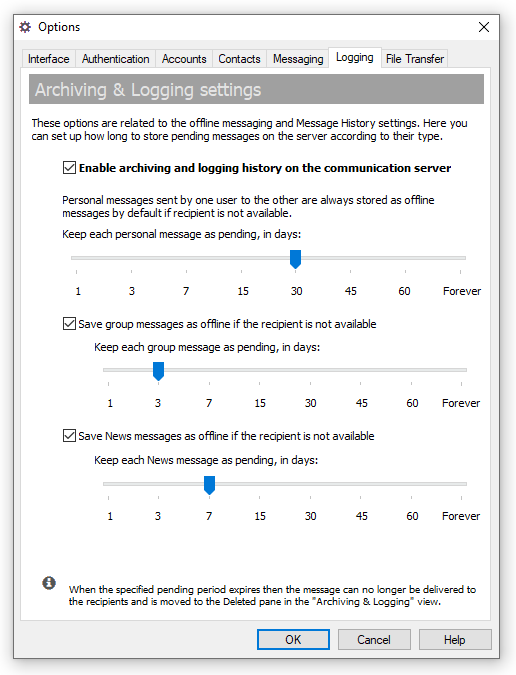
The options on the Logging tab of the Options dialog box are related to Offline Messaging and here you can specify how long to store personal, group and news messages on the server.
To open the Options dialog box click the  button on the toolbar or select the "Tools\Options..." item from the main menu or use the Ctrl+O hotkey.
 |
| Archiving & Logging settings |
- "Enable archiving and logging history of the communication server" — This is a global option to enable Message History on the IM server. If it is turned off then the server will not log and archive any delivered messages between users. Information on pending messages will be also deleted from the communication server once the message will be successfully delivered to it's recipient or period to store pending message expires.
- "Keep each personal message as pending" — Personal messages sent by one user to another are always saved as offline messages by default if the recipient is currently not available. Move the slider and specify how long in days to store personal messages on the server.
- "Save group messages as offline if the recipient is not available" — Group messages sent to Messaging Groups can be also saved on the IM server as offline messages if one or more recipients are not available. Select this option and set the number of days for group messages to be stored on the server.
- "Save news messages as offline if recipient is not available" — News messages sent from the IM server can be also saved as offline messages if one or more recipients are not available. Select this option and specify the period for storing those messages.
 |
| Turning off the logging history on IM server |
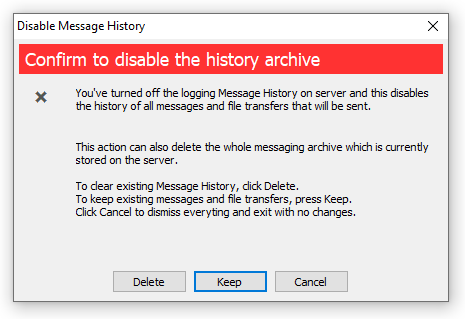
When message history setting is turned off then the server offers options to keep or permanently delete existing message and file transfer archive.
 |
If specified pending period expires then the message can no longer be delivered to the recipients and are moved to the Deleted pane in the Archiving & Logging view. |



 Facebook page
 Follow Us on Twitter
 YouTube channel
 Read Our News and Blog