User interface
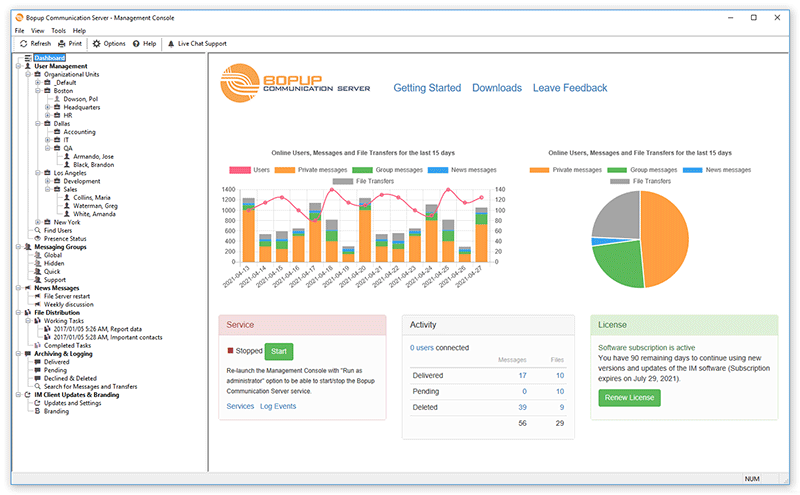
The Management Console has 2 main views: the left pane shows the navigation tree and the right pane shows the result view. Some of the result views may include navigation links that will quickly take you from one view to another if you click them.
 |
| Dashboard |
The Welcome view is a general view displayed once the Management Console is started. This view contains most of the tasks you can perform in the console. The Status Monitor displays the total number of messages delivered and stored on the server for the entire period and the number of currently connected (online) users. It is possible to start/stop IM service using the Status pane. The view also displays charts that show number of connected (online) users within sent private, group, News messages and file transfers per each day for the last 7-day period.
You can use the left tree to access the following general management tools:
- User Management
Add, edit, delete Organizational Units and User Accounts
Move users and units to another OU
Change users permissions to view other users in their Contact Lists
Assign users to Messaging Groups, News Messages and File Distribution tasks
Find/view users in one place
View who is currently connected to the server (Presence Status)
Send instant messages to users
- Messaging Groups
Add, edit, delete, disable Messaging Groups (user groups)
Assign users and manage their permissions to send messages and files
Send instant messages on groups
- MyGroups
View MyGroups (groups created by users)
- News Messages
Add, edit, delete, disable News Messages on the IM server
Send News messages from the IM server
- File Distribution
Add, edit, complete, delete File Distribution tasks
- Archiving & Logging
View, browse and search the Message and Transfer Archive available on IM server
Set the deleted status for pending messages and transfers
Print the selected messages and transfers
- IM Client Updates & Branding
Upload instant messengers setup packages to update the IM client software on users computers in a fully automated mode
Upload brand name and image to rename instant messengers and get IM clients customized with a company logo



 Facebook page
 Follow Us on Twitter
 YouTube channel
 Read Our News and Blog