

 |
 |
Getting Started |
|
|
User's Guide |
|
|
Setup |
|
 |
Installation tips |
|
|
Step-by-Step Setup Guide |
|
|
Installing MS SQL Server 2005/2008/2012 Express Edition as a host database server |
|
|
Installing PostgreSQL/Postgres Pro 9.x/10.x/11.x as a host database server for IM server |
|
|
Migrating and moving Bopup Communication Server Database to a new Microsoft SQL Server |
|
|
Removal |
|
|
Interface |
|
|
User Management |
|
|
Overview |
|
|
Organizational Units |
|
|
User Accounts |
|
|
Move users and Organizational Units |
|
|
Find users |
|
|
Presence status |
|
|
Sending instant messages to users |
|
|
Messaging Groups |
|
|
MyGroups |
|
|
News Messages |
|
|
File Distribution |
|
|
Archiving & Logging |
|
|
IM Client Updates & Branding |
|
|
Tools |
|
|
Import User accounts from the Active Directory (LDAP) |
|
|
Active Directory (LDAP) integration |
|
|
SQL database maintenance |
|
|
IM Client Configuration Tool |
|
|
BCSCmd.EXE command line tool |
|
|
Options |
|
|
Interface settings |
|
|
Authentication settings |
|
|
Account settings |
|
|
Contact List settings |
|
|
Messaging settings |
|
|
Archiving & Logging settings |
|
|
File Transfer settings |
|
|
About |


To view all of your users in one place even if they are located in different Organizational Units (locations), you can use the Find Users view under the User Management section in the tree. You can also switch to this view from the Welcome Page. The view shows the list of users that you can sort by account, full user name, Organizational Unit or by personal authentication method.
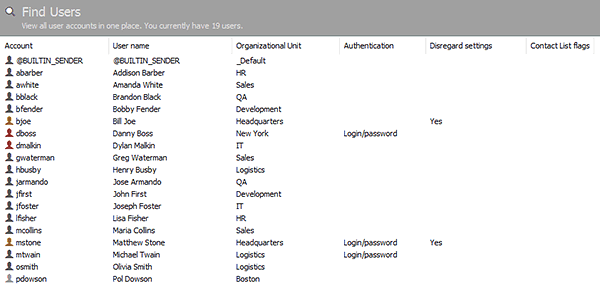 |
| View all users in one place |
Double-click a user account to open the Account profile page view. Right-click an account to access the advanced options via the pop-up menu.


 Facebook page
 Follow Us on Twitter
 YouTube channel
 Read Our News and Blog