

 |
 |
Getting Started |
|
|
User's Guide |
|
|
Setup |
|
|
First Start |
|
|
Interface |
|
 |
User interface |
|
|
Menu |
|
|
Receiving messages |
|
|
Receiving files |
|
|
Favorite messages |
|
|
Message and Transfer History |
|
|
View user's details |
|
|
Hotkeys |
|
|
Options |
|
|
About |


Message and Transfer History is a log of all messages and files that were received by you.
To open Message and Transfer History dialog box click the  Message and Transfer History button on the toolbar or use Ctrl+H hotkey.
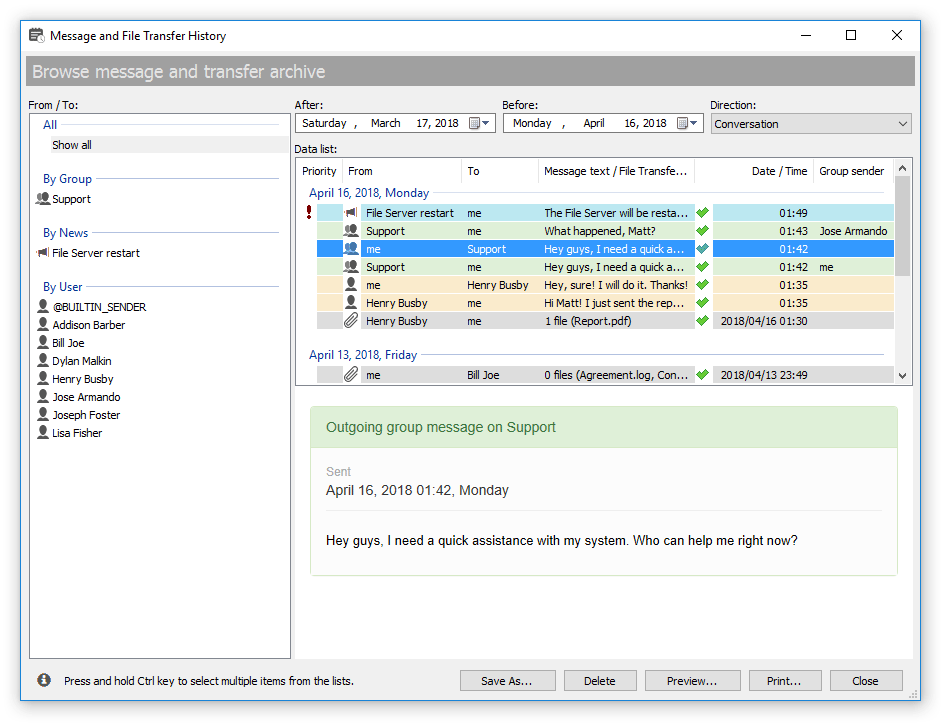 |
| Browse archive of messages and transfers |
You can browse an archive and select messages and file transfers by user, group, and news, specify which type of data to display. Press and hold Ctrl key to select multiple items from the lists.
Available options


 Facebook page
 Follow Us on Twitter
 YouTube channel
 Read Our News and Blog