
English  |  Russian  |  News & Media  |  Site Map
Instant Messaging (IM) software for LAN/WAN/Enterprise networks. Secure IM server and messenger products for private corporate and business communications.
Home Solutions Products Downloads Pricing Online Help Support Contact Us
Home / Products / Bopup Scanner     

Quick Info
Current version
2.1.2

Release date
August 4, 2008

Supported platforms
Windows® 95/98/Me/NT 4.0/2000/XP/2003/Vista

Download Now! ( 264k)


IM Server

Secure instant messaging server for corporate and enterprise communications Bopup Communication Server
Secure IM Server for effective communications over corporate intranets, business networks, office LANs


IM Clients

Secure instant messenger for corporate real-time communications Bopup Messenger
Secure instant messenger for private communications in office LANs, corporate networks or over Internet

One-way IM client for alerting and notification purposes Bopup Observer
One-way IM client for alerting purposes, urgent and secure notifications,
scheduled and instant
messaging


Freeware LAN scanner that resolves NetBIOS, MAC, IP addresses, HTTP servers

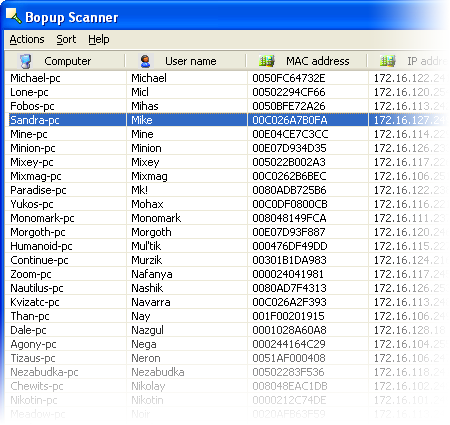
This freeware network scanner displays active computers with logged user names (NetBIOS), MAC and IP addresses. Bopup Scanner also recognizes and shows HTTP (Web) servers running on remote computers (TCP ports 80, 8080), quickly detects online computers, allows to browse shared resources of a remote computer and save results to a text file.

Freeware LAN scanner that resolves NetBIOS, MAC, IP addresses, HTTP servers.

Advanced users can enter IP range to scan, change a timeout to resolve a remote host and run the program from a command line interface.


Key features overview:

Browsing shared resources on remote computers Bopup Scanner allows to open shared folders on remote computers in Windows Explorer. Right-click on a computer and then select "Browse..." from the pop-up menu.
Exploring HTTP servers Bopup Scanner recognizes HTTP (Web) servers running on remote computers (TCP ports 80, 8080) and shows "Running" label in the "HTTP server" column.
Logging results Results can be saved to a text file. Just select "Actions\Save list..." and type a file name to save.
Changing IP range to scan Administrators can enter IP range to scan and timeout to resolve a remote computer.
Command line support The program can be executed with the command line paramaters in order to specify pre-defined options, such as IP range to scan (start and end IP addresses), a path of the file where to save results. So the scanner can be used in batch files as a tool for an automated monitoring.

To see the available command line options run the scanner.exe file with the /? or /h parameters or click More infomation... button in the About dialog.


© 2000—2008 B Labs. All rights reserved.   Terms of Use  |  Privacy Statement  |  Sign Up to Newsletter  |  Send Feedback  |  Contact Us